Object Storage is live at Nirvana Labs
NVMe-backed, S3-compatible Object Storage for shared application files, alongside compute and ABS. Storage is $0.00013/GB-hour; external egress is $0.02/GB.

Object Storage is live at Nirvana Labs: NVMe-backed, S3-compatible storage for the files your applications upload, generate and share.
We started with Accelerated Block Storage (ABS) for workloads that need fast access to live data, including databases, blockchain nodes and analytics systems. Object Storage adds another part of the application stack: shared buckets that your servers and services can access through the S3 API.
You can now run compute, keep database files on ABS and store application objects with Nirvana Labs.
Why we’re adding Object Storage
An application running on one server can save uploaded files to that server’s disk. As the application grows, more servers and background workers need access to those same files. A document uploaded through one server may need to be processed by another and retrieved by a third.
Object Storage gives those services a common destination. Files live in buckets, independent of any one virtual machine. Multiple authorized services can read and write objects through a regional S3 endpoint, so replacing a worker or adding application servers does not require moving the shared files off a machine’s disk.
This is the gap Object Storage fills alongside our compute and block storage: a shared home for application files, with familiar tools and APIs.
How Object Storage works alongside ABS
Many applications use both storage types. Each serves a different part of the workload:
- ABS provides a disk for your server. A database reads and updates its live files on that volume. Application servers communicate with the database to run queries and transactions.
- Object Storage provides buckets for shared files. Application servers and workers read and write objects through S3, including uploaded documents, images, generated reports and datasets.
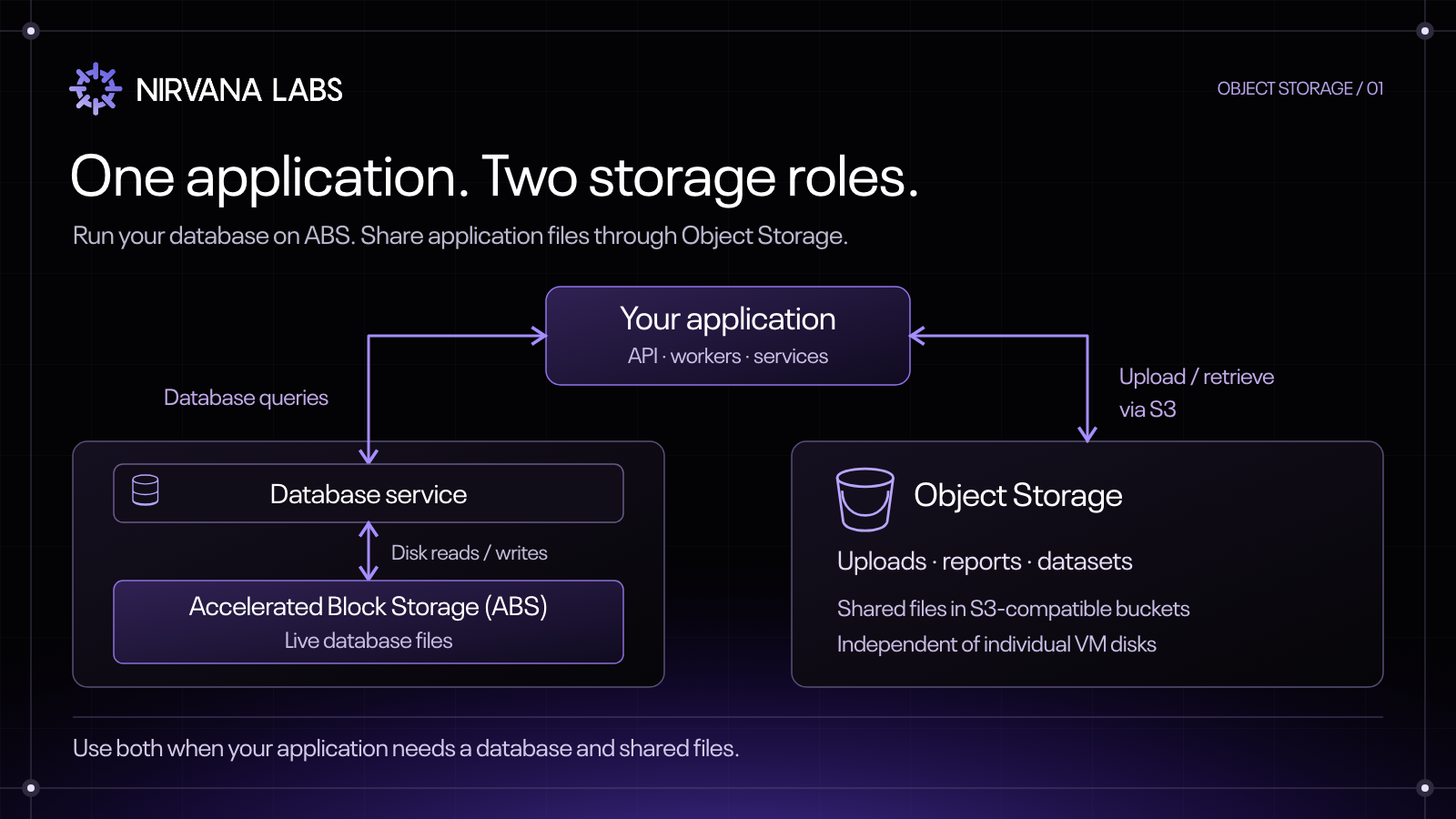
Consider an application that processes customer documents. The database keeps account details, permissions and job status on ABS. Uploaded documents go into an object bucket. Workers retrieve them, perform the processing and write completed reports back to the bucket. The database records which report belongs to each customer.
The same setup can support data pipelines, AI datasets and model artifacts. Your backup tools can also write database exports to a bucket; the database continues to use block storage for its live files.
NVMe-backed storage with familiar S3 tools
Our Object Storage runs on NVMe-backed infrastructure and is designed to support application workloads alongside Nirvana compute. It works with S3 clients such as the AWS CLI, boto3, rclone and AWS SDKs.
Manage buckets and access keys through the Nirvana API, CLI or Terraform provider. Then use your S3 client to upload and retrieve objects.
Each bucket belongs to a project and region. An access key works across that project’s buckets in the same region. Configure your client with the bucket’s endpoint and signing_region values, using credentials from the same project and region.
Regional endpoints are available for San Jose (us-sva-2) and Washington, D.C. (us-wdc-1). Check that Object Storage is enabled for your organization in the region you want to use.
Storage and transfer pricing
Object Storage uses the same base storage rate as ABS: $0.00013 per GB-hour. For example, storing 1 TB (1,000 GB) for 730 hours costs $94.90. Your storage charge depends on the hours and amount of data stored.
Transfers between Nirvana IPs are free. External egress costs $0.02 per GB, or $20 for 1,000 GB transferred out of Nirvana.
For an application using both storage types, calculate ABS capacity, Object Storage usage and external transfer separately, alongside compute. Choose the storage access model that each part of your application needs.
Create your first bucket
- Create a bucket in your project and an enabled region.
- Create an access key for the same project and region.
- Configure your S3 client with that key, the bucket’s endpoint and its signing region.
- Upload an object, then retrieve it from your application.
Both path-style and virtual-hosted S3 URLs work. We recommend path style, which also supports bucket names containing dots without the TLS hostname mismatch that can occur with virtual-hosted URLs.
Follow the Object Storage quickstart to get connected, or explore the documentation for buckets, access keys and regional endpoints.